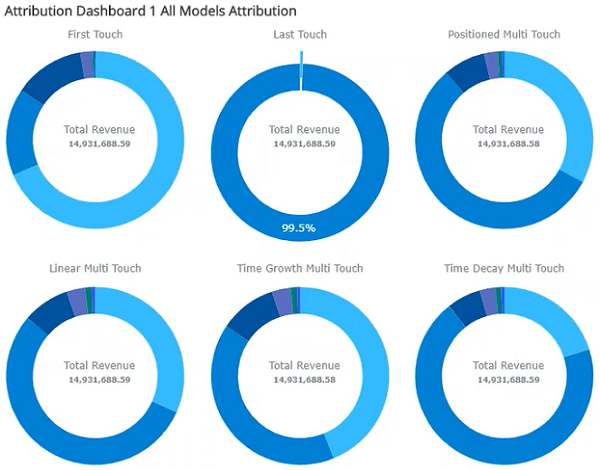
Campaign Attribution allows transaction dates to be attributed to Campaign Communications, enabling a model for reporting on the value that can be attributed to each sales campaign to track effectiveness. Attribution models can display information in a dashboard you can analyze to determine the effectiveness of campaigns.

When multiple campaigns are assigned the same attribution, each campaign will be assigned a percentage contribution. The percentage allocation is dependent on the attribution model:
-
First Touch - will assign greater weighting to the earliest campaign sent to the customer.
-
Last Touch - will assign greater weighting to the most recent campaign sent to the customer.
-
Positioned Multi Touch - will assign greater weighting to the campaign closest to the purchase date, relative to the first and last campaign, i.e. first and last touch are given priority weighting.
-
Linear Multi Touch - will assign greater weighting to the campaign closest to the purchase date using linear relativity, i.e. attribution to campaigns between first and last touch are less influenced by first and last touch, typically receiving higher weighting than they would in a Positioned Multi Touch model.
-
Time growth Multi Touch - will assign greater weighting to the earliest campaign sent to the customer.
-
Time Decay Multi Touch - will assign greater weighting to the most recent campaign sent to the customer.
Create an Attribution Set
-
Click on the Create (+) icon in the Engage Navigation pane to open the Create window.
-
Under Campaigns in the Category dropdown, select Attribution Set.
-
Select the Table, Purchase Date Field, and Purchase Value Field to be assigned to the attribution, i.e. the date and value fields to be linked to the campaign.
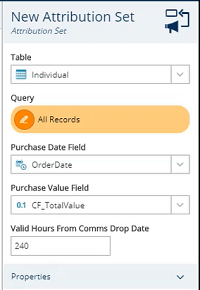
Note: the table level on the attribution set must match the table level on the campaign.
The Valid Hours from Comms Drop Date field assigns a time period for the attributed fields to be considered valid against the given campaign, i.e. a 240 hour value will assign orders placed within 10 days of a campaign to that campaign.
The attribution can be further refined by adding fields to the Query field, e.g. if a campaign is targeting online sales by offering a discount, the query could be limited to 'Web' sales only.

-
Use the hamburger menu to save the attribution set and assign a name to the attribution for use within campaigns.

Add an Attribution to a Campaign
-
Open or create a campaign.
-
Within the campaign settings, expand the Attribution dropdown and assign a previously created attribution to the Touchpoints field.
-
Save the campaign.
When the campaign is run, the attribution model will identify records within the campaign that meet the requirements of the attribution, e.g. include an individual in the attribution model if they make an online purchase within 10 days of the campaign.
Once an Attribution has been configured and the associated Campaign has run, users can analyse the impact of the campaign by returning to the attribution and building the model.

Note: If there are no values, e.g. no online sales within 10 days of a web discount campaign being run, Engage will display the message "No attributed values could be found for this set."
Troubleshooting
-
Set up a query that shows the records that will be used for the attribution, e.g.
[Person_Product_Sale].[Sold_Date_Time] >= { ts '2021-06-09 09:57:28'}
AND [Person_Product_Sale].[Sold_Date_Time] < { ts '2022-05-12 14:49:47'}
AND [Person_Product_Sale].[CF_Line_Price_Exc_VAT_Person_Product_Sale] > 0
Where the date field is the field used in the attribution set for the purchase date property and the purchase value field is > 0.
The selection table should be set to the table that the purchase date field is on.
-
Create a field list at the table level of the attribution set that has just the primary key of that table. Use this field list to display the results.
-
The date range should start from when the campaigns using the attribution set first ran to when they last ran + the valid hours from comms drop date value, e.g.
If the first campaign run was 1st Jan, and
The most recent campaign run was 1 June, and
the valid hours from comms drop date value is 730 hours (where 730 hours is 1 month) the date range would be from 1st Jan to 1st July.
-
If this query doesn’t return any data then no data will be included in the attribution set.
-
If the primary key doesn’t show in the results or there are any null primary key records, e.g. due to the tables not having the correct relationship, then the records will not get included in the attribution set.